


A Simpler Way to Manage Fixed Assets and Depreciation

Managing fixed assets should be straightforward. Yet for many businesses, accountants and finance teams, depreciation is still maintained through complex spreadsheets, manual calculations and disconnected working papers.
As the asset register grows, so does the risk of formula errors, inconsistent depreciation policies, missed disposals and difficult year-end reconciliations.
That is why Projectify developed SimpleDepreciation.com, a cloud-based fixed asset management and depreciation tool designed to help businesses maintain accurate asset records, automate depreciation calculations and produce professional, audit-ready reports without relying on complicated spreadsheets.
What is Fixed Asset Management Software?
Fixed asset management software helps a business record, monitor and report on long-term assets such as:
IT equipment
Fixtures and fittings
Motor vehicles
Plant and machinery
Buildings
Other depreciable assets
A proper fixed asset register should contain more than an asset name and purchase cost. It should also record information such as the asset category, acquisition date, in-use date, residual value, useful life, depreciation method, accumulated depreciation, net book value and disposal details. Simple Depreciation brings this information together in one organised system.
Why Spreadsheet-Based Depreciation Becomes Difficult
Excel remains a powerful tool, but fixed asset registers often become increasingly difficult to manage and maintain as more assets, companies and reporting periods are added.
Common challenges include:
Broken, overwritten or inconsistent formulas
Different useful lives and depreciation policies applied incorrectly
Assets continuing to depreciate after disposal
Incorrect treatment of acquisition and in-use dates
Difficulty calculating depreciation and net book value at different historical or future points in time
Time-consuming preparation of monthly, annual and comparative depreciation reports
Limited visibility over who changed an asset, formula or assumption
No reliable audit trail showing what changed, when it changed and who made the change
Difficulty reconciling opening and closing asset balances
Multiple versions of the same spreadsheet being circulated between users
Increasing complexity when managing separate asset registers for multiple companies
Manual consolidation of asset data across different entities, currencies, financial years and accounting policies
Time-consuming preparation of audit schedules, journals and PP&E movement reports
Assessing depreciation at a specific date can be particularly difficult in a spreadsheet. Finance teams may need to adjust formulas, change reporting periods or create separate versions of the register simply to determine accumulated depreciation and net book value at a previous month-end or future forecast date.
Multi-company management creates further challenges. Each entity may have a different financial year, currency, depreciation method and asset-category structure, resulting in several separate files that are difficult to control and consolidate.
Without a structured audit trail, it may also be impossible to determine why a figure changed or whether an asset record was amended after a report had already been prepared.
A dedicated fixed asset depreciation system reduces these risks by centralising asset records, applying depreciation policies consistently and allowing users to report accurately at different points in time.
Introducing Simple Depreciation
Simple Depreciation is designed for small and medium-sized businesses, accountants, bookkeepers and finance professionals who need a practical way to manage fixed assets.
The application focuses on the essential parts of fixed asset accounting without adding unnecessary complexity.
Users can create companies, define asset categories, add or import assets, calculate depreciation, record disposals and generate supporting reports from one cloud-based platform.
Automatically Calculate Straight-Line Depreciation
Simple Depreciation automatically calculates straight-line depreciation based on the asset information and accounting policy selected. Businesses can choose from methods including:
Monthly pro-rata depreciation
Full-year depreciation in the year of purchase
No depreciation in the first year
This allows depreciation calculations to be aligned with the business’s accounting policy.
The application also distinguishes between the addition date and the in-use date. This is important where an asset is purchased on one date but is not ready or available for use until later. Where applicable, depreciation can begin from the in-use date rather than automatically starting from the purchase date.
Maintain a structured fixed asset register
A well-maintained fixed asset register provides a clear record of the assets owned by a business. Simple Depreciation stores relevant information for each asset, including:
Asset reference
Asset name and description
Asset category
Addition date
In-use date
Original cost
Residual value
Useful life
Accumulated depreciation
Net book value
Actual or projected status
Disposal details
The register can be reviewed online and included in downloadable reports.
Assets are organised consistently by category, helping finance teams avoid fragmented schedules and inconsistent calculations.

Import Assets from Excel
Businesses with existing asset registers do not need to enter every asset manually.
The bulk-import feature allows asset additions to be uploaded from Excel or CSV files. This is useful when moving from a spreadsheet-based register or adding a large number of assets at once. Bulk importing can significantly reduce setup time while preserving a structured and standardised asset record.
Record Asset Disposals and Calculate Gains or Losses
Disposals are a common source of errors in fixed asset accounting. When an asset is sold, scrapped or otherwise removed from use, the accounting records need to reflect:
The removal of the asset’s original cost
The removal of accumulated depreciation
Any disposal proceeds received
The resulting gain or loss on disposal
Simple Depreciation calculates the net book value at disposal and determines the gain or loss automatically. It also generates the relevant double-entry journal information required to derecognise the asset and clear the associated accumulated depreciation.

Generate Depreciation Journal Entries
Rather than manually preparing depreciation journals each month or year, users can generate journal-entry reports for the required period. The reports include depreciation expense and accumulated depreciation entries by asset category, together with disposal-related journals where applicable. Journal reports can be exported to PDF or CSV, making it easier to post the figures into the business’s accounting system or provide them to an external accountant.

Produce PP&E Movement Schedules
A property, plant and equipment movement schedule is a standard component of financial reporting and audit support. Simple Depreciation generates a fixed asset roll-forward showing:
Opening asset cost
Additions
Disposals
Closing asset cost
Opening accumulated depreciation
Depreciation charge
Accumulated depreciation released on disposal
Closing accumulated depreciation
Opening and closing net book value
This provides a clear reconciliation between the beginning and end of the reporting period.
The format is suitable for use across IFRS, US GAAP and many local accounting frameworks, subject to the business’s specific reporting requirements.

Distinguish Between Actual and Projected Assets
Simple Depreciation also supports forward planning. Assets can be marked as either actual or projected, allowing businesses to forecast depreciation arising from planned capital expenditure. This helps management understand how future asset purchases may affect:
Depreciation expense
Profitability
Net book value
Capital expenditure requirements
Future balance sheet values
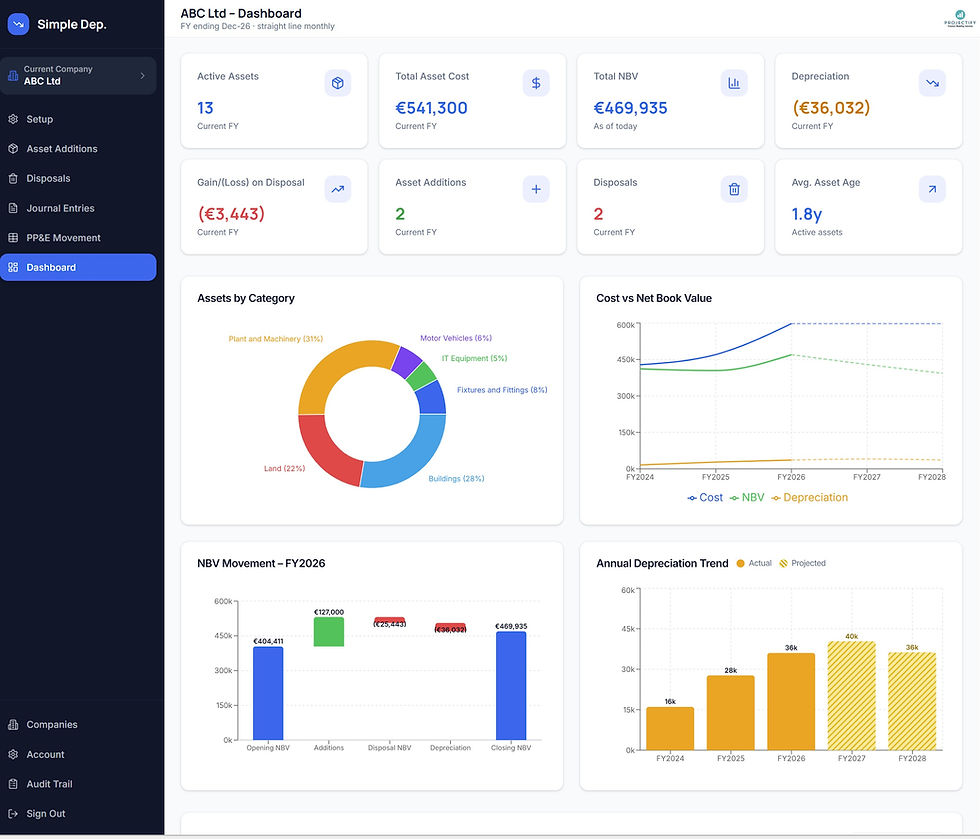
Monitor Assets Through Visual Dashboards
The application includes dashboards that provide a clear overview of the asset base.
Depending on the selected company and reporting period, users can review information such as:
Total asset cost
Accumulated depreciation
Net book value
Depreciation trends
NBV by asset category
Asset additions
Asset disposals
Actual and projected balances
This makes it easier to understand the composition and movement of fixed assets without reviewing individual spreadsheet rows.
Download an Audit-Ready Fixed Asset Pack
Preparing fixed asset schedules for an audit can take considerable time, particularly when information is held across several files.
Simple Depreciation can generate a professional fixed asset audit pack containing key reports such as:
Company and accounting-policy details
Fixed asset register
PP&E movement schedule
Depreciation expense summary
Summary journal entries
Disposal schedule
Asset category summary
Validation checks
The pack brings the main fixed asset records into one consistent PDF, reducing the need to prepare multiple supporting schedules manually.
Maintain a Clear Audit Trail
Reliable financial records should show not only the latest information but also how that information changed. Simple Depreciation includes an audit trail that records changes made across areas such as:
Company and account setup
Asset additions
Asset amendments
Disposals
User and account changes
The log records the date and time of the activity, the user who performed it, the section affected and a description of the action. This improves accountability and provides useful support during internal reviews and external audits.
Manage Multiple Companies from One Account
Accountants, finance teams and business groups may need to maintain separate registers for several legal entities. This avoids the need to maintain separate spreadsheet files and makes switching between company registers easier. Simple Depreciation allows multiple companies to be managed from one account. Each company can have its own:
Currency
Financial year
Depreciation policy
Asset categories
Asset register
Reports
Who is Simple Depreciation Designed For?
The platform may be particularly useful for:
Small and medium-sized businesses
Accountancy and bookkeeping firms
Outsourced finance teams
Startups building their first fixed asset register
Multi-company business groups
Businesses moving away from spreadsheet-based depreciation
Finance teams seeking more consistent audit documentation
It is intended for users who want a focused and accessible fixed asset solution without implementing a large enterprise asset-management system.
Benefits of Moving Depreciation to the Cloud
Using a cloud-based depreciation tool provides several practical advantages:
Consistent calculations - Depreciation is calculated using the same rules across the entire asset register.
Reduced manual work - Automated calculations, imports, journals and reports reduce repetitive spreadsheet tasks.
Centralised records - Asset information is maintained in one location rather than across multiple versions of a workbook.
Easier collaboration - Authorised users can access the same current information without emailing files between team members.
Improved audit readiness - Structured schedules, validation checks and an audit trail provide clearer supporting documentation.
Better forecasting - Projected assets can be included to estimate future depreciation and net book values.
Is Simple Depreciation a Replacement for Accounting Software?
Simple Depreciation is designed to complement, rather than replace, a business’s accounting system. The application calculates and organises fixed asset information, while the resulting journals can be exported for posting into accounting software. This allows businesses to maintain a detailed fixed asset subledger without depending on a basic depreciation function within their general ledger or building a complex spreadsheet model.
Make Fixed Asset Accounting Simpler
Fixed asset accounting is an important part of financial reporting, but it should not require an overly complex spreadsheet.
Simple Depreciation gives businesses a clearer way to maintain their asset register, automate straight-line depreciation, manage disposals, forecast future charges and prepare audit-ready reports.
For businesses and accountants looking for practical fixed asset management software, Simple Depreciation provides a focused solution built around the reporting tasks finance teams perform regularly.
Explore Simple Depreciation at SimpleDepreciation.com and start building a clearer, more reliable fixed asset register.


Comments